from nodebpy import geometry as g

with g.tree("Repeat Grid", is_modifier=True) as tree:
    geometry = tree.inputs.geometry("Geometry")
    columns = tree.inputs.integer("Columns", 4, min_value=1)
    rows = tree.inputs.integer("Rows", 3, min_value=1)
    gap = tree.inputs.vector("Gap", (0.2, 0.2, 0.0), subtype="TRANSLATION")

    # one cell is the geometry's footprint plus the gap between copies
    bounds = g.BoundingBox(geometry)
    cell = bounds.o.max - bounds.o.min + gap

    grid = g.Grid(
        size_x=(columns - 1) * cell.x,
        size_y=(rows - 1) * cell.y,
        vertices_x=columns,
        vertices_y=rows,
    )

    (
        grid
        >> g.MeshToPoints()
        >> g.InstanceOnPoints(instance=geometry)
        >> tree.outputs.geometry("Geometry")
)Repeat Grid
Geometry Script
instancing
Lay out copies of any geometry in rows and columns, spaced by its own bounding box.
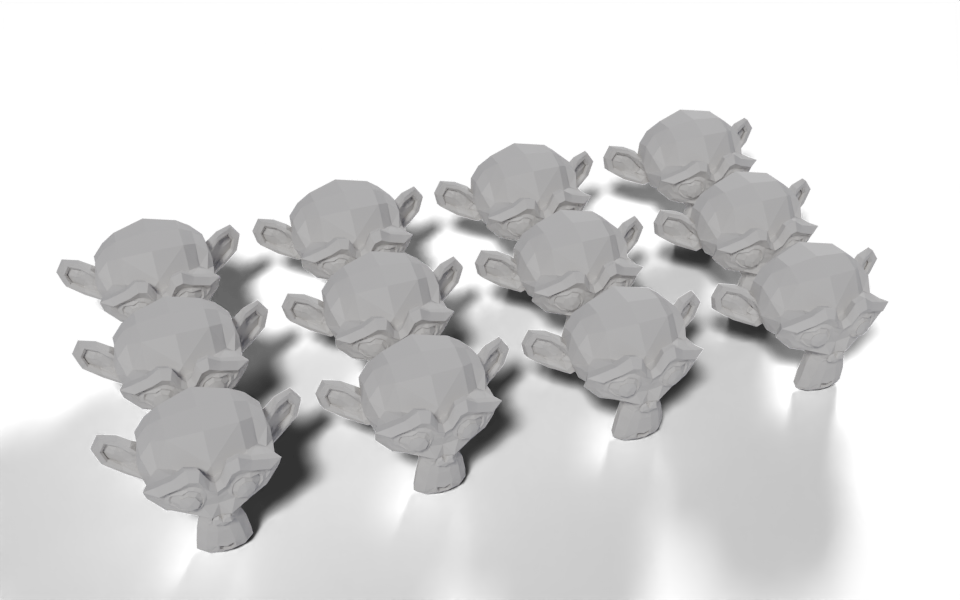
Download .blend The scene in this image: the node trees, materials, camera and lights.
The size of each cell comes from the input geometry itself, so swapping the object for a bigger or smaller one keeps the copies from overlapping without touching the settings.
How it works
- Bounding Box gives the corners of the geometry.
bounds.o.max - bounds.o.minis a Vector Math subtract, and adding theGapvector gives the size of one cell. cell.xandcell.yare socket properties: the first use adds a Separate XYZ node and both read from it.- A grid with
columnsvertices along X hascolumns - 1gaps between them, so it is(columns - 1) * cell.xwide. Its vertices are the cell centres. - Mesh to Points turns those vertices into points and Instance on Points puts a copy of the input on each one.
Geometry inputs can be used more than once: geometry feeds both the Bounding Box and the instance socket.
Node tree
Original
Ported from Repeat Grid.py in Geometry Script. The original uses one more grid vertex than there are copies in each direction; using exactly columns by rows vertices puts one copy on each.