from nodebpy import geometry as g

with g.tree("AnotherTree", collapse=True, is_modifier=True) as tree:
    rot = (
        g.RandomValue.vector(min=-1, seed=2)
        >> g.AlignRotationToVector()
        >> g.RotateRotation(rotate_by=g.AxisAngleToRotation(angle=0.3))
    )
    pos = g.Position() * 2.0 + (0, 0.2, 0.3)

    (
        tree.inputs.integer("Count", 10)
        >> g.Points(position=g.RandomValue.vector(min=-1))
        >> g.InstanceOnPoints(instance=g.Cube(), rotation=rot)
        >> g.SetPosition(position=pos, offset=(0, 0, 0.1))
        >> g.RealizeInstances()
        >> g.InstanceOnPoints(g.Cube(), instance=...)
        >> tree.outputs.geometry("Instances")
)nodebpy


Build node trees in Blender more elegantly with Python code. Geometry Nodes, Shader Nodes and Compositor nodes are all fully supported, with type hints and IDE auto-completion throughout.
pip install nodebpyCreating Nodes With Code
A text-based version of nodes should bring the convenience of writing code with IDE auto-completion, type hinting, with overall compactness and readability, while staying as close as possible to what building a node tree via the GUI feels like.
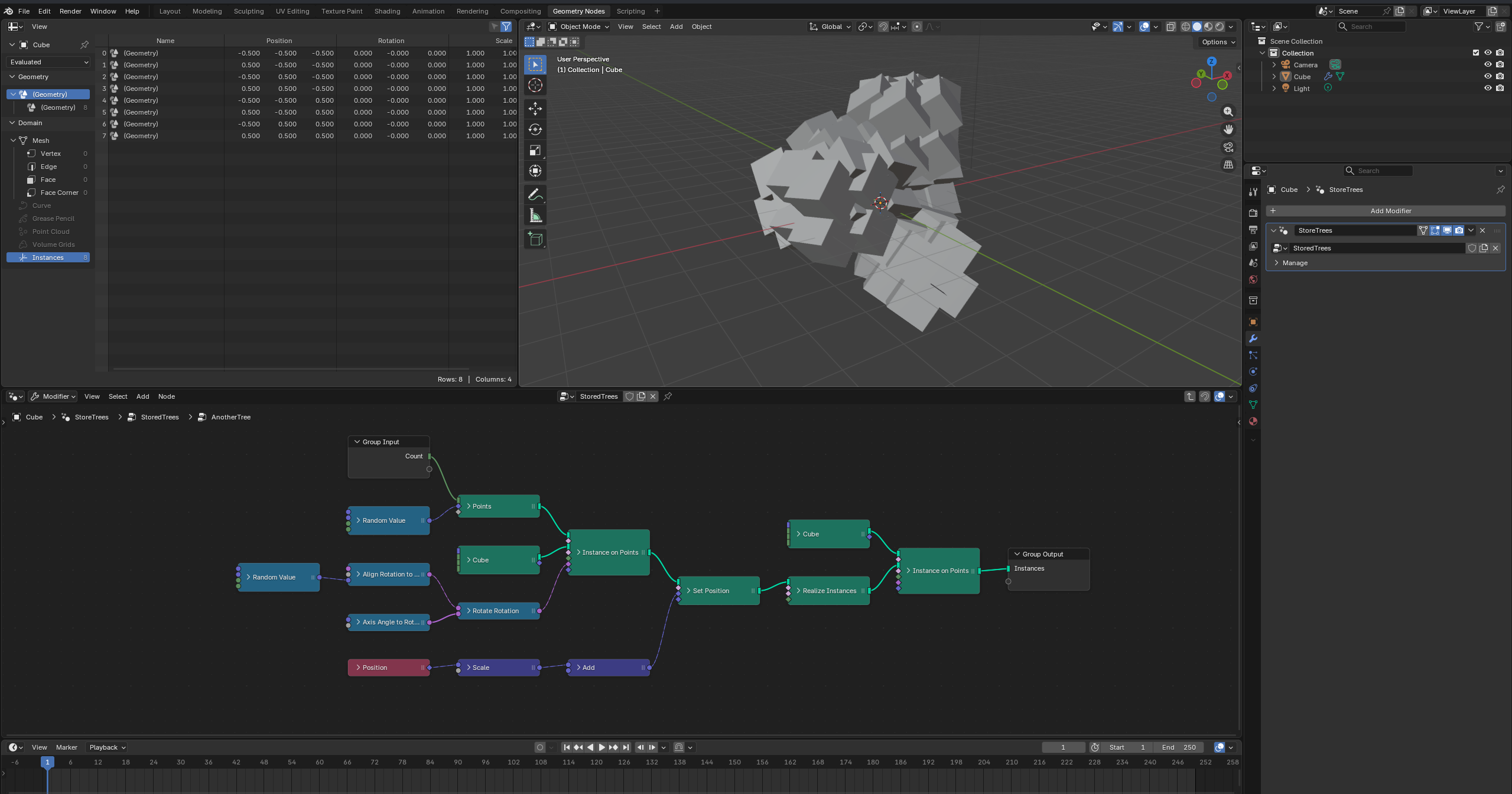
Nodes are created by instantiating their classes inside a with g.tree(...): context, linked with the >> operator (which picks the most compatible socket pair automatically), and the tree’s interface is declared with tree.inputs and tree.outputs. Python’s math and comparison operators create the matching Math, VectorMath and Compare nodes for you.
Where to Start
- Writing Node Trees — adding and linking nodes, tree contexts, interface sockets and zones
- Math Operators — arithmetic, comparison and boolean expressions as nodes
- Node API Design — sockets, the
.i/.oaccessors, enum options and convenience class methods - Custom Node Groups — encapsulate reusable logic as Python classes
- Asset Node Groups — typed classes generated from
.blendasset libraries - Nodes to Code — turn existing node trees back into
nodebpysource - Using
nodebpy— shipping it inside your own add-ons, and the versioning scheme - Comparisons — related projects and how the APIs differ
Documentation for every node class is in the API Reference, built automatically from the Blender node registry.
Design Considerations
The top priority of nodebpy has been type hinting and IDE auto-complete: any tooling that supports authoring regular Python code should also support authoring node trees. Much like databpy, this started as an internal tool used inside of molecularnodes but has since been broken out into its own separate project. It is robustly typed and tested, with the intent that it can be used internally for multiple other add-ons and projects.
- Node classes are named after nodes: ‘Random Value’ ->
RandomValue() - Node ‘subtypes’ and methods are accessible via dot (
.) for easier IDE auto-complete and authoring:RandomValue(data_type="FLOAT_VECTOR")->RandomValue.vector()
- Node properties are available on the top level, with inputs and outputs available behind
.i.*and.o.*accessors:AccumulateField().o.totalreturns the outputTotalsocketAccumulateField().i.valuereturns the inputValuesocket
Most of the node classes are auto-generated from Blender’s live node registry — see CONTRIBUTING.md for how the generator works.